When the Window Fills Up
Leila's agent has been working on her quarterly report for two hours. It started sharp. Now it's slower, it has twice redone something she'd already approved, and a message on the screen says the conversation was "compacted". Two different things have gone wrong, and both come from the context window.
Problem one: the window fills up
You saw in Everything It Can See that the context window has a limit, and that an agent fills it fast with the files it reads and the output of what it runs. When the window is nearly full, the app around the model has to make room, or the next request won't fit.
It could simply drop the oldest messages. But the oldest messages often hold the most important thing: your original request. So most agents do something cleverer, called compaction: they ask the model to write a summary of the conversation so far, and then replace the long history with that summary. The session carries on with a much smaller context.
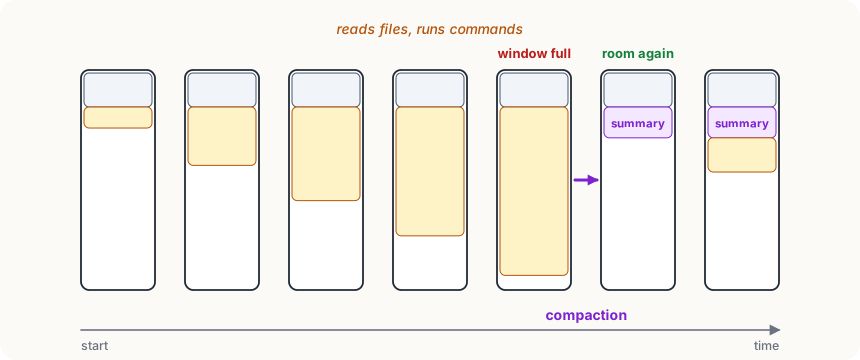
In Claude Code, compaction happens automatically as the window gets close to full, and you can also ask for it yourself with /compact. You can even say what to keep: /compact keep the list of files we changed and the decisions about the chart colours.
Leila So compaction solves it. Nothing is lost.
Omid What does a summary of a two-hour conversation look like?
Leila A page, maybe. The main points.
Omid And the two hours had what in them?
Leila Every file it read, every command, every little thing I said, like "use the blue from last year's report"... Oh. A summary keeps the gist and loses the details.
Omid Right. And it doesn't always know which details you'll care about later. That's one reason it redid something you'd approved: the approval may not have made it into the summary.
Leila And the other thing? It was slower and vaguer before it compacted.
Omid That's the second problem, and it's sneakier.
Problem two: a crowded window works worse
A context window isn't like a desk where everything is equally easy to reach. Researchers have found that models are better at using what's near the start and the end of a very long context than what's buried in the middle. A well-known 2023 study, called "Lost in the Middle", showed this clearly: put the one useful fact in the middle of a long pile of documents, and models found it less often.
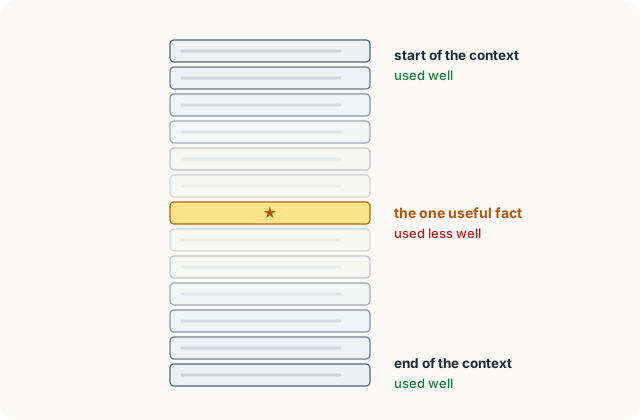
Careful
Newer models are much better at long contexts than the ones in that study, and how much a long context hurts depends on the model and the task. But people who build and use agents still see the same pattern: a long, cluttered context tends to make answers worse. Some call it context rot.
Clutter makes it worse. A long session is full of old file contents, long outputs, and failed attempts. Remember from The Model Remembers Nothing that wrong turns stay in the history and keep pulling the model back. The model has to find what matters in all of that, every request.
So the context is a resource to look after, like your own attention: the less irrelevant stuff in it, the better the model works, and the cheaper and faster each request is.
Keeping the context clean
The best habits all come down to one idea: keep in the window what the current task needs, and little else.
- One task per session. When you finish one job and start an unrelated one, start a new conversation. In Claude Code,
/cleardoes this: the next request starts with an empty conversation (whatever loads at the start of every session still does). - Compact on purpose, with a note. Before a long session gets crowded, compact it yourself and say what must survive, rather than waiting for automatic compaction to guess.
- Keep important things in a file. Ask the agent to write the plan, the decisions so far, or a progress list into a file. A file survives compaction and a new session; the agent can read it again whenever it needs to.
- Read less, search more. Ask the agent to search for the lines that matter instead of reading every file whole. Most agents do this by themselves when they can.
- Hand side tasks to a helper. A big search can be done by a separate helper agent with its own window, which brings back only the answer. There's a lesson on these helpers later in the course.
Try it
Next time a long chat or agent session starts to feel vague or repetitive, try this: ask it to "write a short summary of what we're doing, what's decided, and what's left". Read the summary, fix anything wrong, then start a fresh session with just that summary. Compare how sharp the answers are.
Using it well
- Start a new session for a new task. It's the simplest way to keep the context small, relevant and cheap.
- Compact before the window decides for you, and say what to keep. You know which details matter; the automatic summary has to guess.
- Put decisions and plans in a file. Text in a file outlives any compaction and any session, and the agent can reread it on demand.
- Treat strange forgetfulness as a full-window symptom. If an agent forgets something it clearly knew, check
/contextor look for a "compacted" message before blaming the model.
Words to know
- compaction - replacing a long conversation history with a summary of it, to free space in the context window; keeps the gist, loses details
- context rot - the way answers tend to get worse as the context grows long and cluttered, even before it's full
- clearing a session - starting again with an empty conversation (
/clearin Claude Code), keeping only what loads at the start
Big idea
A full window forces compaction, which keeps the gist and loses details; a crowded window works worse even before it's full. Keep the context small and relevant: one task per session, important things in files.