Hooks: Rules That Always Run
Leila's CLAUDE.md says, clearly: "After editing a report, always run python check_report.py on it." Most days, the agent does. But twice this week it edited a report and moved on without checking, and both times the report had an error the check would have caught.
The instruction was there. Why wasn't it followed?
Leila It's in the instruction file. In capital letters, even. And sometimes it just doesn't do it.
Omid What is the instruction file, from the model's point of view?
Leila Text in its context. Near the top, every request.
Omid And how does the model decide what to write next?
Leila It predicts the next token from everything in its context. So my instruction makes "run the check" very likely... but not certain. Especially in a long session, with lots of other text competing.
Omid That's it. An instruction is a strong push, not a guarantee. For most things, a strong push is plenty. But for this one, how often do you need it to happen?
Leila Every single time.
Omid Then don't leave it to the model. Who else is involved in every edit?
Leila The harness. Every tool call goes through it.
Omid So ask the harness to do it. Tell it: "whenever an edit has just happened, run this command." The harness doesn't predict anything. It just does it, every time.
Leila So I move the rule from the model's side to the program's side.
Omid From words to code. That's what a hook is.
What a hook is
A hook is a command that the agent's harness runs automatically at a fixed moment in its work, every time that moment comes, whatever the model has in mind. The moments are called hook events.
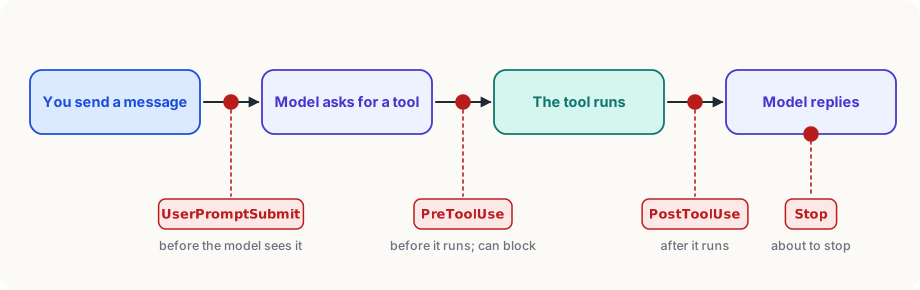
In Claude Code (as of 2026) the main hook events are:
- UserPromptSubmit: you've sent a message, before the model sees it.
- PreToolUse: the model has asked for a tool, before it runs. A hook here can block the action.
- PostToolUse: a tool has just run. A hook here can check or tidy up its result.
- Stop: the agent is about to say it's finished. A hook here can send it back to work.
- SessionStart, before compaction, when a helper agent finishes, and more than thirty in all.
A hook that blocks
Hooks are set in the same settings files as permissions. This one runs a small script before every shell command:
{
  "hooks": {
    "PreToolUse": [
      {
        "matcher": "Bash",
        "hooks": [{ "type": "command", "command": ".claude/hooks/no-rm-rf.sh" }]
      }
    ]
  }
}"PreToolUse" is the event; "matcher": "Bash" means "only for shell commands"; "command" is what to run. The harness hands the script a description of the event in JSON, including the command the model wants to run. The script:
#!/bin/bash
command=$(jq -r '.tool_input.command')
if echo "$command" | grep -q 'rm -rf'; then
  echo "Blocked: don't use rm -rf here. Delete files one by one." >&2
  exit 2
fi
exit 0Line by line: jq pulls the command out of the JSON; if it contains rm -rf (delete everything in a folder, with no questions), the script prints a reason and ends with exit code 2, Claude Code's signal for "block this". The command never runs, and the reason goes back to the model as a tool result, so it can try another way. Exit code 0 means "fine, carry on".
A hook that always tidies up
This one runs a formatter (a tool that fixes a file's layout) after every edit:
{
  "hooks": {
    "PostToolUse": [
      {
        "matcher": "Edit|Write",
        "hooks": [{ "type": "command", "command": "jq -r '.tool_input.file_path' | xargs npx prettier --write" }]
      }
    ]
  }
}"Edit|Write" matches either file tool. The command picks the edited file's path out of the JSON and runs the formatter on it. Leila's report check would be the same, with her own script in place of the formatter.
Words or code?
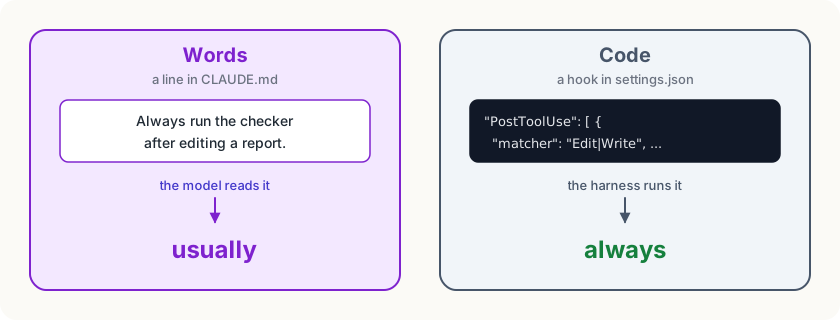
Both have their place. Most guidance is judgement ("prefer short functions", "explain your changes"), and judgement can only be words. But if a rule must hold every time, with no exceptions, and a script can check it, it belongs in a hook.
Careful
A hook is a command that runs on your computer with your permissions, every time its event happens. Only use hooks you've read and understood, and be wary of projects that bring their own.
Try it
In Claude Code, type
/hooksto see which hooks are set up (probably none yet). Then look at your instruction file, or your list of habits with any agent, and mark each rule "usually" or "always". The "always" ones are your first hooks.
Using it well
- Use hooks for musts, instructions for shoulds. Formatting, checks, forbidden commands: hooks. Style, priorities, explanations: instructions.
- Make a Stop hook your definition of finished. A hook that runs the tests when the agent tries to stop, and sends it back if they fail, means "done" always means "tests pass".
- Give a useful reason when you block. The model reads the reason and tries again, so "Blocked: use the trash/ folder instead" works better than "No."
- Keep hooks fast. They run every time; a slow hook makes every action slow.
Words to know
- hook - a command the agent's harness runs automatically at a fixed moment, every time, whatever the model has in mind
- hook event - one of the moments a hook can run, such as before a tool runs, after it runs, or when the agent is about to stop
Big idea
An instruction asks the model to do something, and the model usually does. A hook makes the harness do it, every time. Put "usually" in words and "always" in code.