A Model With Hands
Leila has 300 photos from a company event, all named things like IMG_4471.jpg. She wants them renamed by the date they were taken, like 2026-10-14_001.jpg. She asks a chat assistant, and it gives her clear instructions: eleven steps and a small script to copy and run. Then she asks an agent, and a minute later the photos are renamed.
Both used the same kind of model. What made the difference?
Leila Last lesson you said the model only reads and writes text. But the agent renamed my files. Something touched my computer.
Omid Something did. What do you think it was?
Leila The app around it? Like with the web search.
Omid Yes. Let's slow it down. Imagine the app tells the model, before your message: "You can ask me to run commands on Leila's computer. To do that, write the command in this special format, and I'll run it and tell you what happened." What would the model write first?
Leila If I were it, I'd first want to see the photos. So... a command to list the files?
Omid Good. The app runs it and pastes the list back in. Now what?
Leila I'd look at one photo's details to find the date it was taken. Then write a command to rename them all. Then list them again to check it worked.
Omid So how many times did the model write something?
Leila Four or five. Each time it saw the result of the last step and then decided the next one.
Omid That's an agent. The model still only writes text. But some of that text is a request to do something, the program around it carries the request out, and the result comes back for the model to read. Round and round, until the job is done.
Leila And the chat assistant couldn't do that because...
Omid Its app didn't offer it any way to run commands on your computer. Same kind of brain, no hands.
What makes an agent
An AI agent is a language model put inside a program that gives it three things:
- Tools: actions the model can ask for, like reading a file, running a command, searching the web or editing a document. The model writes the request; the program does the action.
- A loop: after each action, the result goes back to the model, which decides what to do next. It keeps going until it decides the task is done.
- A goal: your request ("rename these photos by date"), which the model works towards over many steps, choosing each step itself.
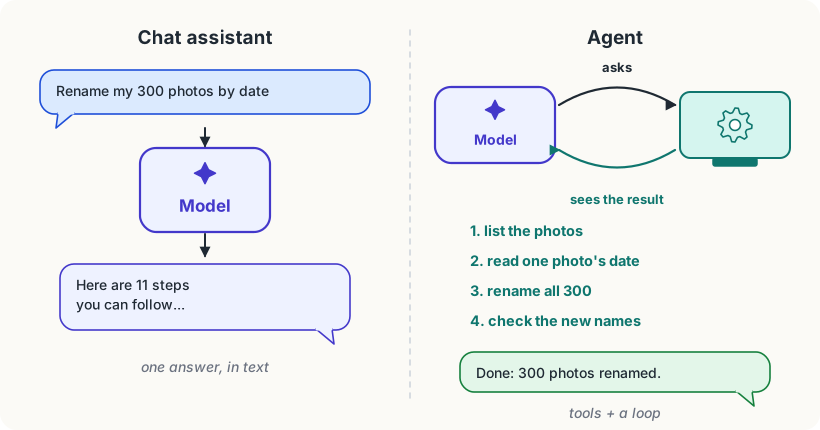
The important part is the last one: the model chooses the steps. Compare a workflow, where a programmer has fixed the steps in advance: "take each new email, ask the model to sort it into one of five folders, move it there." The model helps at one step, but it doesn't decide what happens next. In an agent, nobody wrote down "first list the files, then read the dates": the model worked that out, and could have done something different if the files had been different.
That's what makes agents powerful, and also what makes them harder to predict. Much of this course is about getting the first without being surprised by the second.
Agents you might meet
- Coding agents like Claude Code, Codex, Cursor and Gemini CLI work in a folder of files on your computer: they read code, edit it, run it, and fix what breaks. Many people who don't program use them for files and data too.
- Browser agents click through websites to fill in forms or compare prices.
- Office agents work on documents, spreadsheets and email.
They differ in their tools, but inside, they all work the way Leila worked out. This course uses Claude Code as its running example, because it's widely used and shows every part clearly. What you learn applies to the others.
The parts of an agent, and this course
Every part of an agent gets its own module:
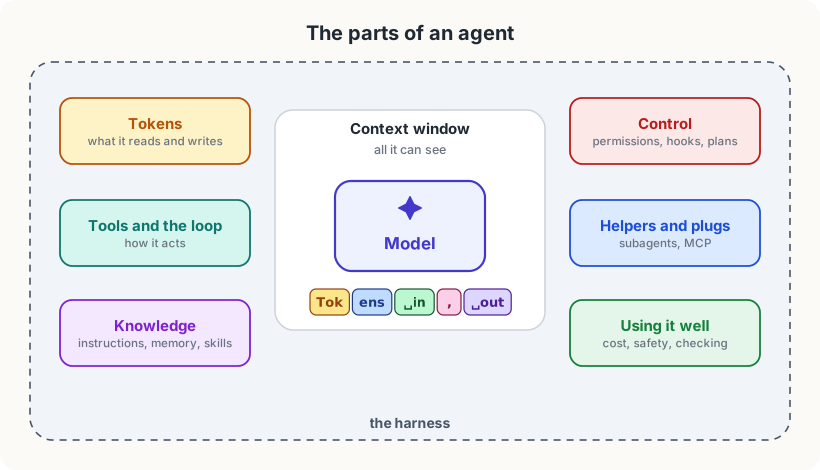
- Tokens: the pieces of text a model really reads and writes, and why they decide its speed, its limits and its price.
- The context window: everything the model can see at one moment, and what happens when it fills up.
- Tools and the loop: exactly how a tool request works, and the program that runs the loop around the model.
- Giving an agent knowledge: instruction files, memory and skills.
- Keeping an agent in check: permissions, hooks and planning before acting.
- Many agents, many tools: helper agents and MCP, a standard way to plug in new tools.
- Using agents well: cost, safety, checking the work, and how to hand over a task.
Try it
Ask a chat assistant to do something on your computer, like "make a folder called test on my desktop". Notice what it does instead: it tells you how. Then, if you have an agent (Claude Code, Codex, Cursor or similar), ask it the same in an empty practice folder and watch the steps it takes. Most agents show each action before or as they do it.
Using it well
- Ask for the outcome, not the steps. An agent's strength is choosing the steps. "Rename these photos by the date taken, like 2026-10-14_001.jpg" works better than eleven instructions of your own.
- Watch the first few actions. Each step is a guess that the result will check. If its first steps head the wrong way, stop it and say so: that's cheaper than letting it carry on.
- Use a workflow when the steps never change. If a job is the same every time, fixed steps are faster, cheaper and more predictable than an agent working them out again.
Words to know
- AI agent - a language model inside a program that gives it tools and a loop, so it can work towards a goal over many steps, choosing each step itself
- tool - an action the model can ask the program to carry out, like reading a file or running a command
- workflow - a fixed series of steps written by a person, where a model may help at some steps but doesn't choose them
Big idea
An agent is a language model with hands: it asks for actions, sees what happened, and decides what to do next, again and again until the job is done. The model still only writes text; the program around it does the acting.