Skills: Knowledge on Demand
Leila's company has a 30-page brand guide, a checklist for client proposals, a procedure for the monthly report, and four other documents her agent keeps needing. She has learned that an instruction file makes the agent know things in every session. So why not put all seven documents in it?
Leila If CLAUDE.md works so well, I'll just paste all seven procedures into it. Then the agent always knows them.
Omid How long would that be?
Leila About 50 pages. Maybe 30,000 tokens.
Omid And how often would you need the proposal checklist?
Leila Once a month, when we send a proposal. The brand guide maybe twice a week.
Omid So most days, what would those 30,000 tokens be doing?
Leila Sitting in every request, costing money and taking space. And, from what we saw about crowded contexts, making it easier to miss the things that do matter that day.
Omid Now think of a big reference book. Do you read it cover to cover before every task?
Leila No, I look at the contents page, find the chapter I need, and read only that.
Omid That's the idea. What if the agent always had just the contents page: a line or two about each procedure. And only when a task matched one of those lines, it opened the full procedure.
Leila Then the procedures cost almost nothing until they're needed. But how does it know which one matches?
Omid By reading the lines on the contents page. So those lines had better be good.
What a skill is
A skill is a folder that teaches an agent one procedure or area of know-how. At its heart is a file called SKILL.md: a short name and description at the top, and the full instructions below. The folder can also hold extra files the instructions refer to, like a reference sheet, a template or a small script.
Here is Leila's brand-check skill, in Claude Code's format:
---
name: brand-check
description: Checks a document or chart against the company brand
  guide (colours, fonts, logo, tone). Use when the user asks to check
  or fix branding, or before anything is sent to a client.
---

# Brand check

1. Read the document the user names.
2. Compare its colours with colours.md in this folder.
3. Check the logo with: python check_logo.py <file>
4. List each problem with its page, then suggest a fix.The part between the two --- lines is the skill's header. name is what it's called (and how you can start it yourself). description says what it does and when to use it. Everything below is the procedure itself, written as clear steps.
Load only what you need
The trick is in when each part reaches the context. This is called progressive disclosure: show a little first, and more only when it's needed.
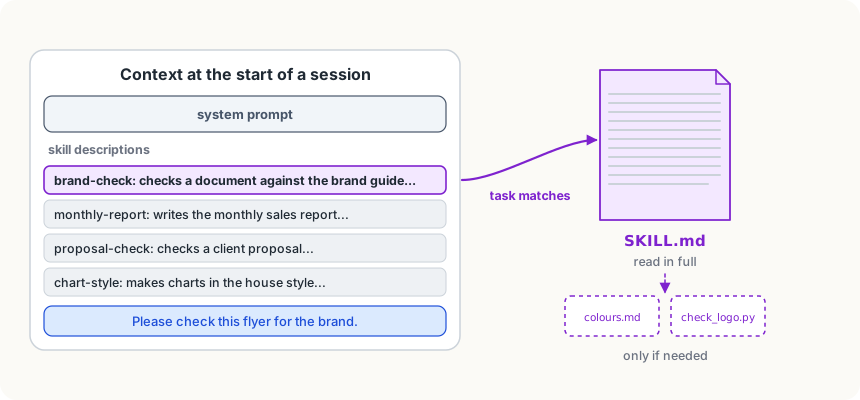
- Always: at the start of every session, only each skill's name and description go into the context. Twenty skills might cost a couple of thousand tokens, not a hundred thousand.
- When a task matches: the agent reads the whole SKILL.md into the context, and follows it.
- Only if needed: the extra files in the folder are opened one at a time, if the steps call for them. A script can simply be run, so the agent sees its result without ever reading its code.
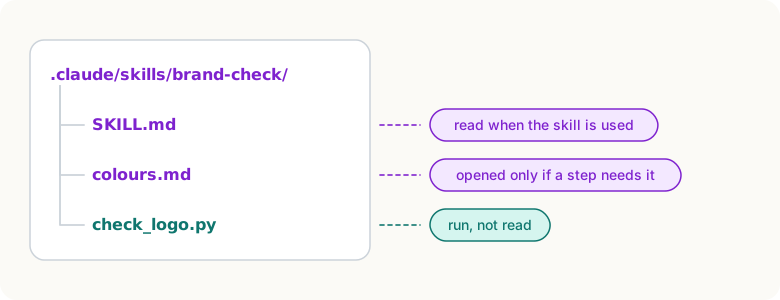
In Claude Code, skills live in a project's .claude/skills/ folder (shared with the team) or in your own ~/.claude/skills/. The agent decides to use one when your request matches its description; you can also start one yourself by typing a slash and its name, like /brand-check. Other agents have adopted the same SKILL.md format, so a well-written skill travels.
The description does all the work
When the agent is deciding whether a skill fits, the description is all it has seen. A vague description means the skill is never used, or used at the wrong time.
- Weak:
description: Brand stuff. - Strong:
description: Checks a document or chart against the brand guide (colours, fonts, logo, tone). Use when the user asks to check or fix branding, or before anything is sent to a client.
The strong one says what the skill does and the situations it's for, in the words people actually use when they ask.
Instruction file or skill?
- Instruction file: short facts every session needs. Where things are, the house rules, the commands.
- Skill: a procedure needed sometimes, too long to carry everywhere. How to write the monthly report, how to check a proposal, how to make a chart in the house style.
A good test: if most sessions would never use it, it's a skill.
Try it
Pick a task you explain to your agent (or a chat assistant) again and again. Write its steps as a SKILL.md: a name, a description that says what and when, and five numbered steps. If you use Claude Code, save it as
.claude/skills/<name>/SKILL.mdin a practice project, start a new session, and ask for the task in your own words, without naming the skill. Did it find it?
Using it well
- Write the description for the moment of choosing. Say what the skill does and the words a request would contain when it's needed.
- Keep SKILL.md focused, and move the details out. Long reference material goes in its own file in the folder, which is only opened if a step needs it.
- Turn repeated explanations into skills. If you've explained the same procedure in three sessions, write it down once as a skill.
- Use scripts for the exact parts. A step that must be done precisely, like checking a file's format, is safer as a small script the skill runs than as words the model follows.
Words to know
- skill - a folder that teaches an agent one procedure: a SKILL.md file with a name, a description and instructions, plus any extra files it needs
- SKILL.md - the main file of a skill; its header holds the name and description, and its body the steps
- progressive disclosure - giving the agent a short summary first and the full details only when they're needed, so the context isn't filled with things it may never use
Big idea
A skill keeps a procedure out of the context until it's needed: the agent carries only a short description, and opens the full instructions when a task matches. That lets an agent know many things without paying for all of them in every request.