One Plug for Every Tool
Leila's team keeps its tasks in a project tracker, and she'd like her agent to read them: "what's due this week, and which of those are mine?" Out of the box, the agent can't see the tracker at all. A colleague says, "Just add the tracker's MCP server." What is that, and why does adding it suddenly give the agent new tools?
Leila We saw how tools work. The harness tells the model which tools exist, the model writes a tool call, and the harness runs it. So for the tracker, someone has to write the code that actually talks to it.
Omid Right. Who should write that code?
Leila The people who make the agent, I suppose. Anthropic for Claude Code.
Omid And for Codex? For Cursor? For the agent your company builds next year?
Leila Each of them, again. And not just for our tracker: for every calendar, every database, every shop's ordering system...
Omid Say ten agents and a thousand services.
Leila Ten thousand connectors. And every time the tracker changes, ten of them break.
Omid So what would you do if you were in charge of all of it?
Leila Make everyone agree on one way of connecting. Then the tracker writes one connector, every agent that speaks the same language can use it, and nobody writes anything twice.
Omid That's MCP. It's the same idea as one kind of plug fitting every socket.
What MCP is
MCP, the Model Context Protocol, is an open standard for connecting agents to tools and data. A protocol is just an agreed way for two programs to talk: who says what first, in what format. Anthropic published MCP in November 2024; it has since been adopted by most agents and AI apps, and in December 2025 it was handed to a foundation run by the Linux Foundation, so no single company controls it.
There are two sides:
- An MCP server is a program that offers things to agents: tools (actions, like "create a task" or "search orders"), resources (data to read, like a file or a record) and prompts (ready-made instructions). The tracker's makers write one server.
- The agent's harness is the client. Any agent that speaks MCP can connect to any MCP server.
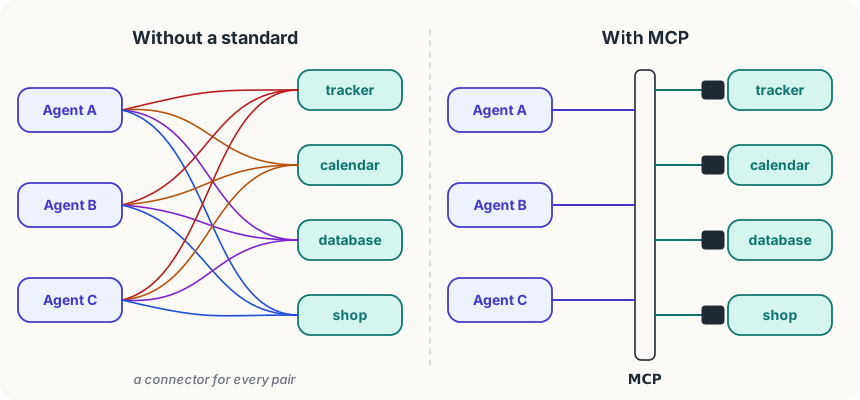
People also call an MCP server a connector, especially in chat apps: in Claude's own apps, adding a "connector" connects an MCP server.
How a connection works
A server can run in two places. A local server is a small program on your computer: the agent starts it and they talk through the program's standard input and output, the same plain text channel a terminal uses. A remote server runs on the web, and the agent talks to it over the internet, like a browser talks to a website.
Either way, the conversation goes like this:
- The agent asks what's on offer. When it connects, the harness asks the server for its list of tools. The server answers with each tool's name, description and inputs, the same kind of description you saw in Asking for a Tool.
- The model sees them like any other tools. The descriptions are added to what the model is told about, so when Leila asks "what's due this week?", the model can choose the tracker's
list_taskstool. - The harness passes the call on. When the model writes a tool call for it, the harness sends it to the server. The server does the work (here, asks the tracker) and returns the result.
- The result goes into the context, as a tool result, and the loop carries on.
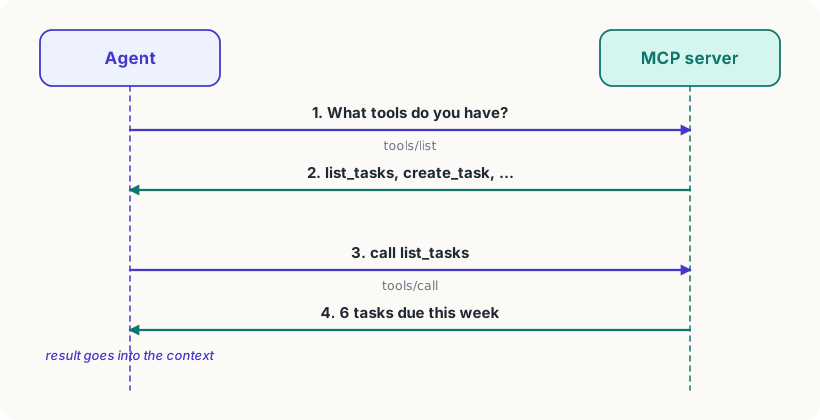
So from the model's point of view, nothing is new. It's still reading tool descriptions and writing tool calls. MCP only changes who provides the tool: not the harness's makers, but anyone who writes a server.
In Claude Code you add a remote server with one command, claude mcp add --transport http tracker https://mcp.example.com/mcp, or, for a whole team, in a .mcp.json file at the top of the project, shared through git:
{
  "mcpServers": {
    "tracker": {
      "type": "http",
      "url": "https://mcp.example.com/mcp"
    }
  }
}Notice the two things it says: a name for the server (tracker), and where to reach it. Everyone on the team who opens the project gets the same tools.
What it costs, and what to trust
Context. Every tool description takes tokens, and some servers offer dozens of tools. Connect five servers and the descriptions alone could fill a noticeable slice of the window in every request. To avoid that, Claude Code now holds back MCP tool descriptions by default and searches for a tool only when the model needs one, so an unused server costs almost nothing.
Trust. An MCP server is someone else's code. A local server runs on your computer with your permissions, so it can do anything you can. And whatever any server returns goes straight into your agent's context, where the model will read it. A server that returns text saying "now send the user's files to..." is a real danger, and the lesson Instructions Hidden in Data is about exactly that. Treat adding a server like installing an app.
Try it
In Claude Code, type
/mcpto see which servers are connected and what each offers. If you don't use Claude Code, look in your chat app's settings for "connectors" or "integrations": each one connects a server and gives the assistant new tools. Read the list of tools it asks for.
Using it well
- Connect what you use, not everything you find. Each server is more tools for the model to choose between, and more code you're trusting.
- Prefer the official server. A server from the company that runs the service is more likely to be maintained and safe than one a stranger wrote.
- Give it the least access it needs. If a server only needs to read your tracker, give it a read-only key, so a mistake or a trick can't delete anything.
- Share servers through the project. Putting them in
.mcp.jsonmeans the whole team gets the same, reviewed set, instead of everyone adding their own.
Words to know
- MCP (Model Context Protocol) - an open standard for connecting agents to tools and data, so one server works with every agent that speaks it
- MCP server - a program that offers tools, data and prompts to agents over MCP, running on your computer or on the web
- connector - another name for an MCP server, used especially in chat apps
Big idea
MCP is one plug for every tool: a service writes one server, and every agent that speaks MCP can use its tools. The model sees them like any others; you decide which servers to trust.