Memory Is a File
Last week Leila told her agent, in passing, that her manager likes charts with the newest month on the left. This week, in a brand-new session, the agent puts the newest month on the left without being asked. She never wrote that in her instruction file.
The model is stateless. So who remembered?
Leila I know the model can't remember. But something did.
Omid Let's find it. Where could last week's conversation possibly be now?
Leila Not in the model. Not in this session's context, because it started empty. So it has to be... written down somewhere? On my computer?
Omid Yes. While you were working last week, the agent noticed that you'd said something worth keeping, and wrote a short note into a file. This week, the harness loaded that file into the new session's context.
Leila The agent wrote it? Not me?
Omid That's the difference from your CLAUDE.md. You write the instruction file on purpose. The agent writes its memory as it goes, when it learns something that will matter later: a preference, a fact about the project, a mistake not to repeat.
Leila So "memory" is just the agent keeping a diary.
Omid A diary it reads at the start of every session. Which means anything in it gets believed, every session, until someone changes it.
Leila Even if it's wrong?
Omid Even if it's wrong. Hold on to that.
How agent memory works
Agent memory is notes an agent writes to files during one session and reads back in later sessions. The model still remembers nothing; the files do.
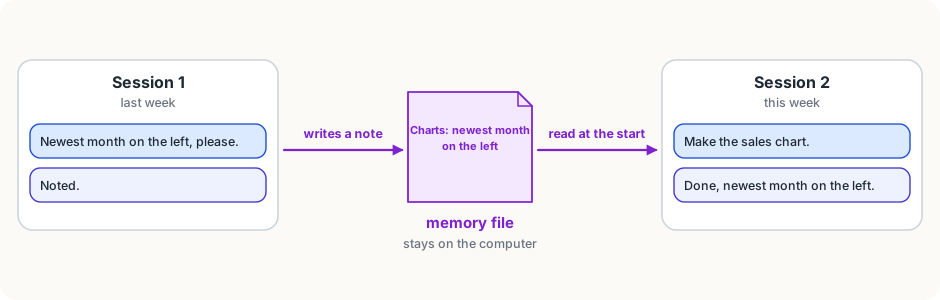
It works in two steps.
- Writing. During a session, when the agent learns something worth keeping, it uses an ordinary file tool to save a note: "Leila's manager wants the newest month on the left in charts." Often you'll see it do this, as one more action in the session.
- Reading. At the start of the next session, the harness puts the memory into the context, just as it does with an instruction file.
There's a catch you'll recognise from the last lesson: everything loaded at the start costs space in every request. A year of notes would fill the window. So memory is usually kept in two layers:
- a short memory index, one line per note, which is loaded into every session;
- the notes themselves, in their own files, which the agent opens only when the index suggests one is relevant.
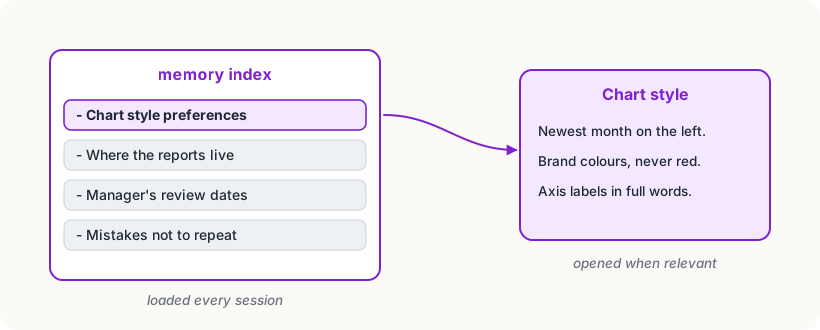
Claude Code's auto memory works this way: it keeps notes for each project, and loads the start of its memory index (about the first 200 lines) into every session. Chat assistants with a "memory" feature do much the same: they save short facts about you and slip them into your conversations' context.
Memory or instruction file?
Both are text, loaded at the start of every session. The difference is who writes them, and so how much you can trust them.
- Your instruction file is written by you (or your team) on purpose. You decided every line.
- Memory is written by the agent, from what it understood at the time. It can misunderstand ("Leila always wants charts in blue", when she meant just that once), and it can go stale ("reports are due on Fridays", until they move to Mondays).
Because memory is loaded into every session, a wrong note is not a one-time mistake. It's a mistake repeated, confidently, until someone fixes it.
The good news is that memory is plain text. You can open it, read it, correct it and delete it. In Claude Code, /memory shows you both your instruction files and the agent's memory. In chat assistants, look for a "manage memory" setting.
Try it
If your chat assistant or agent has memory, open it and read every note. Find one that's out of date or not quite right, and fix or delete it. If it has no memory feature, ask it at the end of a long session: "What from this session would be worth remembering for next time?" That's what an agent would write down.
Using it well
- Read the memory now and then. A five-minute look once a month catches the notes that are wrong or stale, before they cause the same mistake again and again.
- Move important notes into your instruction file. If a memory turns out to matter every time, give it a line in CLAUDE.md, where you control the wording.
- Say "remember this" when it matters. Agents with memory usually save what you explicitly ask them to keep, in the words you choose.
- Say "forget that" when it's wrong. Or delete the note yourself. Don't just correct the agent in the session: the old note will be loaded again tomorrow.
Words to know
- agent memory - notes an agent writes to files during a session and reads back in later sessions, so it can carry what it learned from one session to the next
- memory index - a short list, one line per note, loaded into every session; the full notes are opened only when needed
Big idea
An agent's memory is a set of files, not something inside the model: it writes notes in one session and reads them in the next. Because those notes are believed in every later session, they're worth reading and correcting, just like your own instructions.