Plan First, Then Act
Leila asks her agent to "update the quarterly report with the new sales figures". It gets to work at once: thirty minutes, forty edits, three new charts. When she looks, it has rebuilt last year's report, not this quarter's, and changed the table layout her manager relies on. Every edit was careful. The whole thing was wrong.
Where should she have caught it?
Leila It was so busy. If it had just told me what it was about to do, I'd have spotted the wrong report in ten seconds.
Omid So when was the cheapest moment to find the mistake?
Leila Before the first edit. It misunderstood my request at the very start; everything after that was built on it.
Omid And how much did it cost to find it at the end?
Leila Thirty minutes of its work, plus my time checking forty edits, plus undoing them.
Omid That's the shape of most agent mistakes. Not a slip in one step, but a wrong idea of the job, carried out very well. Now, a model writes its plan as it goes, one step at a time. What if you made it write the whole plan first, and stop?
Leila Then I'd read the plan. "Step 1: open reports/2025-Q3..." Wrong report. I'd fix it in one line.
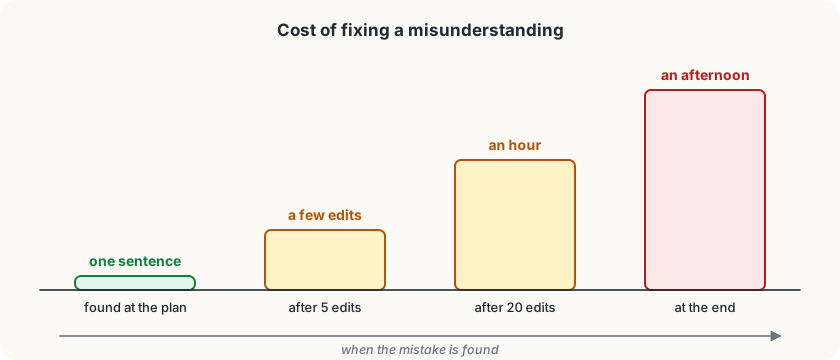
Omid A wrong plan costs a sentence to fix. A wrong report costs an afternoon.
Plan mode
Plan mode is a way of working where the agent may look but not touch: it can read files, search and think, but it can't edit anything or run anything that changes things. Its job is to come back with a plan. You read it, correct it, and only when you approve does it start working.
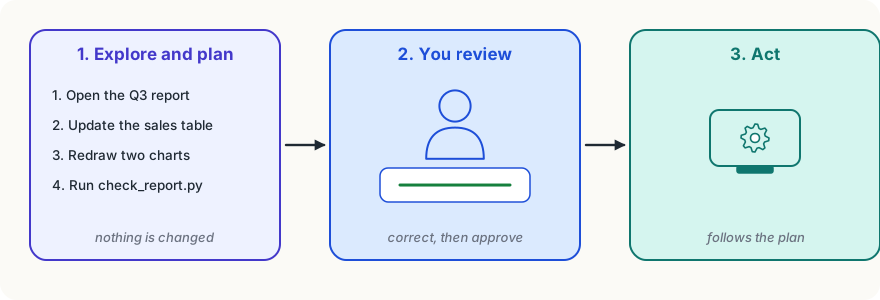
In Claude Code (as of 2026) you switch to plan mode with Shift+Tab, the same key that switches the permission modes, because plan mode is a permission mode: it's simply one in which every change is refused. You can also start a message with /plan. When the plan is ready, Claude Code shows it and asks whether to go ahead, and you can tell it what to change first. With any agent, you can get much the same by asking: "Don't change anything yet. Read what you need and give me a plan."
Why it works
Three reasons, and each goes back to something you already know about agents.
A mistake is cheapest at the start. A misunderstanding at the start is carried into every step that follows, and the model rarely goes back to question its own earlier choices. Caught in a plan, it's one line to fix.
A plan is easy to check. You can't easily review forty edits, but you can read ten lines of plan and see "wrong report", "missing the March figures", "don't change the table layout".
The plan stays in the context. Once approved, the plan is part of what the model sees on every later step. Like a good set of notes, it keeps a long piece of work on track. For a big job, ask the agent to save the plan to a file and tick off steps as it goes, so it survives even if the session is compacted.
Steps and checkpoints
Two more habits make big jobs safer.
Break the work into steps you can check. Instead of "redo the whole report", approve a plan whose steps each end in something you can look at: "1. update the sales table, then stop so I can check it." Smaller steps mean smaller mistakes.
Know how to go back. A checkpoint is a saved point in a session that you can return to. Claude Code keeps checkpoints as it works, and /rewind takes the conversation, the files or both back to an earlier point, so a wrong turn can be undone in a moment. (A file changed only by commands it ran, never by its file-editing tools, isn't covered, which is one more reason to keep your work in a version-control system like git.)
Try it
Next time you give an agent a task that will take more than a few minutes, start with: "Don't change anything yet. Look at what you need and write a numbered plan." Read the plan before you let it start. Count how many things you corrected that would otherwise have become edits to undo.
Using it well
- Plan first for anything big or unclear. If the task touches many files, takes more than a few minutes, or could be understood two ways, ask for a plan before any change.
- Read the plan for the wrong idea, not the wrong word. Look for a misunderstood goal, a missing part, or a change to something that should stay the same.
- Make the plan say how each step will be checked. "Then run check_report.py" or "then stop and show me the table" turns a plan into one you can follow along with.
- Undo early. If the first steps go wrong, rewind and correct the plan, rather than asking the agent to patch its own mistakes on top.
Words to know
- plan mode - a way of working in which the agent can read and explore but not change anything, and comes back with a plan for you to approve
- checkpoint - a saved point in a session that you can go back to, undoing what happened after it
Big idea
Most expensive agent mistakes are a wrong idea of the job, carried out well. Asking for a plan before any change catches them when they cost a sentence to fix, not an afternoon.