Handing Over a Task
Two people on Leila's team ask the same agent for help with the same monthly sales report. One types "Make the report better." The other writes six lines. The first gets a report with a new colour scheme and a rewritten introduction nobody wanted. The second gets exactly what she needed, in half the time.
Same model, same tools, same report. The difference was the brief.
Leila Here's what I'm about to give my agent: "Update the sales report for October."
Omid Imagine you're the agent. You start blank. What do you know?
Leila Only what's in the context. The system prompt, our CLAUDE.md, and that one line.
Omid Which report? Where is it?
Leila There are three in the shared folder. It would have to guess. Fine: "the regional sales report in reports/regional.xlsx".
Omid Update it with what?
Leila October's numbers, from the export Sami sent this morning. Which it has never heard of, so I need to say where that is too.
Omid And when it's finished, how will it know it's finished?
Leila When the October column is filled in... and the totals add up, and the chart includes October. I should say that, or it'll stop at the first one.
Omid Anything it must not touch?
Leila The September numbers. They've been sent to the board. And it shouldn't email anyone.
Omid Read me what you've got now.
Leila Six lines. And every one of them is something it would otherwise have guessed.
A vague request and a good brief
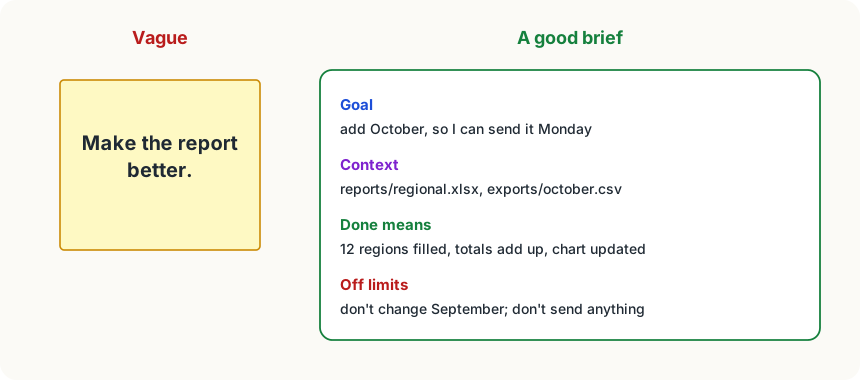
Here is Leila's finished brief:
Goal: add October to the regional sales report, so I can send it to
the sales team on Monday.
Context: the report is reports/regional.xlsx. October's numbers are in
exports/october.csv (Sami's export; amounts are before tax, like the report).
Done means: the October column is filled for all 12 regions, the totals
row adds up, and the chart on the Summary sheet includes October.
Off limits: don't change any September or earlier numbers, and don't
send or share anything.It's short. Each line is there because of something you now know about how agents work.
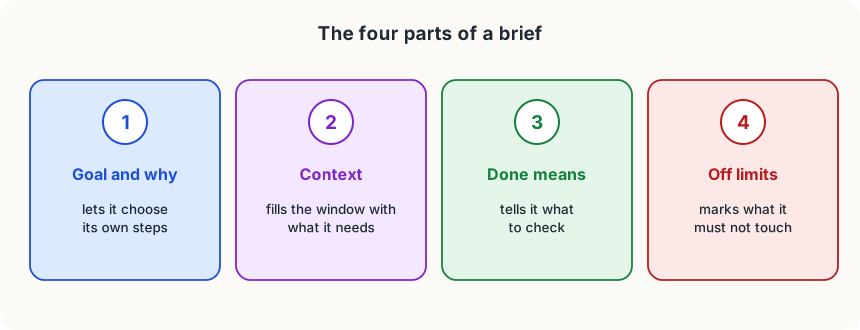
The four parts, and why each matters
1. The goal, and why. "Add October so I can send it on Monday" tells the agent what to aim for and how good is good enough. As you saw in A Model With Hands, an agent chooses its own steps; a clear outcome lets it choose well, and "why" helps it decide the small things you didn't mention.
2. The context it can't guess. The model sees only its context (Everything It Can See) and remembers nothing from last time (The Model Remembers Nothing). Anything not in the window, it will fill in with a guess, confidently. Point to files rather than pasting them: the agent can read what it needs. Facts every session needs, like where reports live, belong in an instruction file, so you don't repeat them in every brief.
3. What done looks like, and how to check it. Without it, the agent stops when its story sounds finished. A checkable definition of done tells it what to verify before it reports, and tells you what to check after.
4. What's off limits. Things that must not change and actions it must not take. For anything that really must never happen, back the words with permissions or a hook: words are followed usually, rules always.
The size of the task
A good brief also fits the job to how agents work:
- Big or unclear job? Plan first. Ask for a plan, read it, fix it, then let it work (Plan First, Then Act).
- One task per session. A fresh session for a new task keeps the window clean and the cache useful (When the Window Fills Up).
- Lots of reading for a small answer? Let a subagent do it.
- Show, don't describe. One example of the output you want ("format each row like this one") beats a paragraph about it.
What you can now explain
You started this course with a chat assistant and a question: what's actually on the other side? You can now explain:
- that a language model reads and writes tokens, one at a time, and that tokens decide speed, limits and price;
- that it remembers nothing, and sees only its context window, which fills up;
- how a model that only writes text uses tools, and the loop and harness that turn it into an agent;
- how you give an agent knowledge (instruction files, memory, skills), keep it in check (permissions, hooks, plans), and extend it (subagents, MCP);
- why long sessions stay affordable (caching), why reading the web is risky (prompt injection), and why "done" needs checking.
All of it comes back to one picture: a model that reads a window of text and writes the next piece, inside a program that decides what goes into the window and what the writing is allowed to do. The next step is building an agent yourself. You'll find the loop at its heart is only about thirty lines of code.
Try it
Take a task you'd give an agent this week and write the brief in four labelled parts: Goal, Context, Done means, Off limits. Before you send it, read it as if you were the agent, starting blank: what would you still have to guess? Add a line for each guess.
Using it well
- Write the four parts. Goal and why, context it can't guess, what done means, what's off limits. It takes two minutes and saves twenty.
- Read your brief as the agent. Start from nothing but the brief and your instruction file; every guess you'd have to make is a line to add.
- Put the repeated parts in an instruction file. If you write the same context in every brief, it belongs in CLAUDE.md or AGENTS.md.
- Make "off limits" real. Write it in the brief, and for anything that must never happen, set a permission rule or a hook too.
Words to know
- brief - the message that hands a task to an agent: the goal, the context it needs, what done looks like and what's off limits
- done criteria - the checkable conditions that say a task is finished, written into the brief
Big idea
An agent knows only what's in its window, and fills every gap with a confident guess. A good brief closes the gaps: the goal and why, the context, what done means, and what's off limits.