One Request, One Reply
Leila has been using agents at work for a few months. She knows they're a model with a program wrapped around it, and she has started to wonder what that program looks like. Her plan is to build one for her monthly reports: a small agent that reads the sales files, writes the summary and checks the numbers. Her friend Omid, who builds agents for a living, has offered to build it with her, one piece at a time. They start with the smallest piece of all: one question, one answer.
Leila So where do we start? With the loop? The tools?
Omid Smaller. Before an agent can do anything, your program has to be able to ask the model one question and get one answer. What do you think that request has to say?
Leila The question itself, obviously. And which model I want, since there are several.
Omid Good. Anything else? Think about what the model does with your question.
Leila It writes an answer, one token at a time... until it decides to stop. Oh: and if it never decided to stop, I'd pay for an endless answer. So I should say how long the reply may be.
Omid That's the whole request: which model, the longest reply you'll accept, and the conversation so far, which right now is just your question.
Leila And the model runs where? On my laptop?
Omid On the provider's computers. Your program sends the request over the internet and waits for the reply. Everything else an agent does, you'll write yourself, on your side of that line.
A door between two programs
When one program asks another for something in a fixed, agreed format, the agreed format is called an API (application programming interface). The Claude API is the door through which any program can send a request to Claude and get a reply. The model runs on Anthropic's computers; your program never sees the model itself, only what comes back.
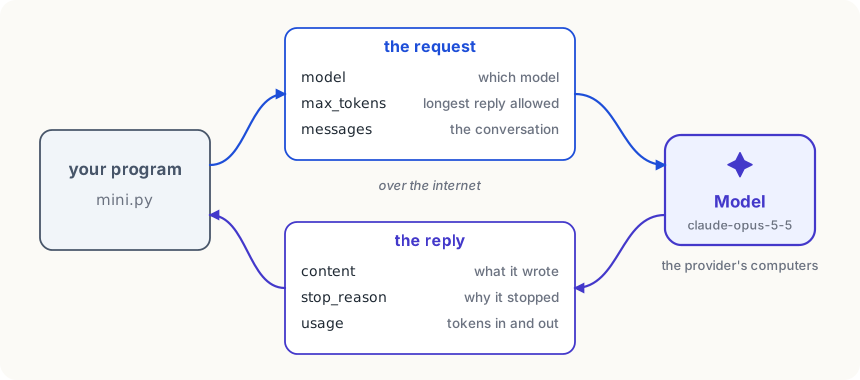
Underneath, a request is a piece of JSON sent over HTTPS, the same way a browser talks to a website. You could build that by hand, but you don't need to: Anthropic publishes an SDK (software development kit), a Python library that builds the request, sends it, and turns the reply into Python objects. Install it once:
pip install anthropicThe key stays out of the code
The provider has to know who is asking, so that it can bill the right account. That's what an API key is for: a long secret string, made in the Claude Console (Anthropic's site for developers), that your program sends with every request. Anyone who has your key can spend your money.
So the key never goes into your code. Code gets copied, pasted into chats, and pushed to shared places like git, and a key inside it goes everywhere the code goes. Instead, you put the key in the terminal's environment (settings the terminal hands to every program it starts), and the SDK reads it from there:
export ANTHROPIC_API_KEY=sk-ant-...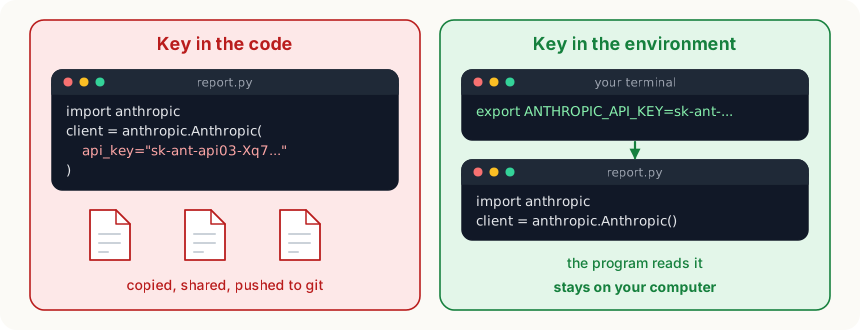
The smallest call
Here is the whole program. It's also how mini, the agent you'll build in this course, begins:
import anthropic

MODEL = "claude-opus-5-5"
client = anthropic.Anthropic()  # reads ANTHROPIC_API_KEY

reply = client.messages.create(
    model=MODEL,
    max_tokens=1000,
    messages=[{"role": "user", "content": "Say hello in one short sentence."}],
)
for block in reply.content:
    if block.type == "text":
print(block.text)What to notice:
anthropic.Anthropic()makes a client, the object that talks to the API. It finds the key in the environment by itself.client.messages.create(...)sends one request and waits for the reply. Its three arguments are the three things Leila worked out:model,max_tokens(the most tokens the reply may use) andmessages(the conversation, here one message from the user).messagesis a list of dicts, each with aroleand acontent. One message now; the next module is about why it's a list.- The reply isn't a string. It's an object, and the text is inside
reply.content, a list of blocks. Why a list, and what theifis for, is the next lesson.
MODEL is a constant at the top so there's one place to change it. claude-opus-5-5 is Claude's largest everyday model in late 2026. For practising, claude-haiku-5-5 is about 40 times cheaper and plenty for most exercises in this course.
What one call costs
You pay for the tokens of every request: the input you send and the output the model writes. In late 2026, Opus 5.5 costs about 4 dollars per million input tokens and 20 dollars per million output tokens. The hello above is a dozen tokens in and under a hundred out (its thinking included), so it costs around a sixth of a cent. An agent session is a different matter, because every step sends a lot more, so it pays to understand the bill from the start. You'll work it out exactly in The Price of a Reply.
Leila And that's it? That's what's inside Claude Code?
Omid That call is inside it, yes. Claude Code makes it again and again, with a lot more in the request each time. Everything else it does is ordinary code around this one line.
Leila So the model doesn't know it's in an agent at all.
Omid It knows what's in the request. Nothing more. Which means every feature of an agent is something we'll have to put in the request ourselves.
Try it
If you have an API key, save the program as
hello.py, set the key in your terminal and runpython hello.py. Then change the question, and the model toclaude-haiku-5-5, and run it again. If you don't have a key yet, read the program line by line and say what each argument is for; every later lesson builds on these ten lines.
Using it well
- Keep the key in the environment, never in a file you share. If a key ever does end up in code or a chat, delete it in the Console and make a new one.
- Practise on a small model. Ideas that work on Haiku usually work on Opus; switch to the larger model when the task needs it.
- Add only a small amount of credit while you learn. A bug in a loop can make many calls in a minute, and you'd rather it stopped for lack of credit than ran up a bill.
- Put the model name in one constant. You'll change it often, and one place to change it means you never run half a program on one model and half on another.
Words to know
- API - an agreed format in which one program asks another for something; the Claude API is how a program sends requests to Claude
- API key - a secret string that identifies your account in every request; kept in the environment, never in code
- SDK - a library that builds requests and reads replies for you, here the
anthropicPython package - request - one call to the model: which model, the longest reply allowed, and the conversation
Big idea
Talking to a model from your own program is one request and one reply: which model, how long the reply may be, and the conversation. Everything an agent adds, it adds by putting more into that request, and by what it does with the reply.