Build or Borrow
mini is about 230 lines, and Leila understands every one of them. Then a colleague shows her a few lines that do much of what mini's loop does, from the same anthropic package. Another uses a library that comes with file editing, permissions, hooks and compaction already built. Did she waste her time building mini?
Leila If there's a library for it, why did we write the loop ourselves?
Omid When mini does something odd, where do you look?
Leila I know where. A tool result that went to the wrong place, a permission that said no, a compaction that lost a detail. I've written each of those parts.
Omid And with someone else's library?
Leila Inside the library... but I'd still know what kind of thing to look for, because it has to do the same jobs. Run the loop, send results back, check permissions, manage the context.
Omid That's what building mini bought you: you can read any harness now. So when would you still write your own?
Leila When I need something the library doesn't do. Or when the job is small, and a library would be more to learn than to write.
Omid And when would you borrow?
Leila When it's a big, serious agent. Someone else has already found the hundred edge cases I haven't.
Ready-made agent code
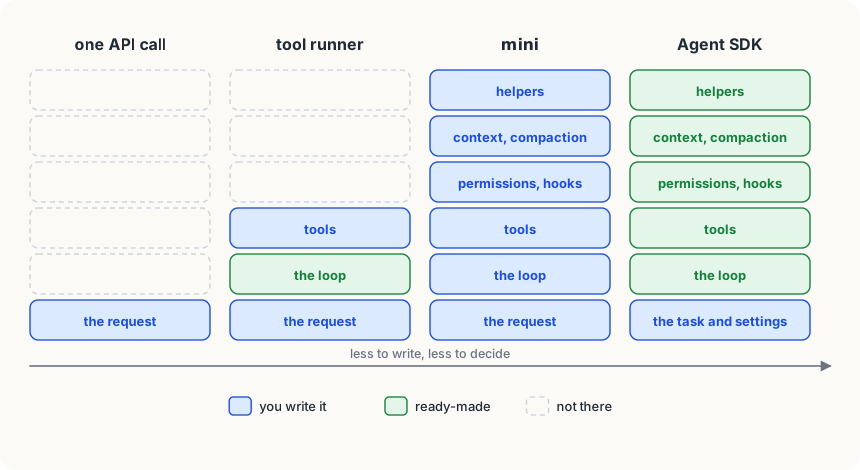
An agent framework is ready-made code that runs the agent loop, and often much more, so you write the tools and the task instead. They range from small to large. Two from Anthropic show the range well.
The tool runner is part of the anthropic package (in beta as of late 2026). You write each tool as an ordinary Python function with type hints and a docstring, mark it with the @beta_tool decorator, and the SDK builds the tool's description and input schema from them. Then tool_runner runs the loop:
import anthropic
from anthropic import beta_tool

client = anthropic.Anthropic()

@beta_tool
def word_count(path: str) -> str:
    """Count the words in a text file.

    Args:
        path: The file's path.
    """
    return str(len(open(path).read().split()))

runner = client.beta.messages.tool_runner(
    model="claude-opus-5-5",
    max_tokens=16000,
    tools=[word_count],
    messages=[{"role": "user", "content": "How many words are in notes.txt?"}],
)
for message in runner:
print(message)A decorator is the @beta_tool line above a function: it hands the function to beta_tool, which wraps it with what the SDK needs. Notice what you didn't write: no tool_schemas, no run_tool, no while loop, no matching of tool_use_ids. Each time round, the runner sends the request, runs any tools the model asks for, sends the results back, and gives you the model's message. It stops when the model asks for no more tools. What it doesn't do is everything else mini does: no permission prompts, no hooks, no instruction file, no skills, no compaction. Those are still yours to add.
The Claude Agent SDK is the other end of the range: Claude Code's own harness as a library, for Python (claude-agent-sdk) and TypeScript (@anthropic-ai/claude-agent-sdk). It comes with the tools Claude Code uses to read, write and edit files and run commands, the agent loop, context management including compaction, permission settings and hooks, subagents and MCP connections. Like Claude Code, it reads the project's CLAUDE.md and skills unless you tell it not to (its setting_sources option). You give it a task and settings, and it works the way Claude Code does, inside your program.
What each one gives you
Here is mini's list of parts, and who writes each one:
| part | mini | tool runner | Agent SDK |
|---|---|---|---|
| the loop | you | the SDK | the SDK |
| tool descriptions | you | from your functions | built in, plus yours |
| running tools, results back | you | the SDK | the SDK |
| file and command tools | you | you | built in |
| permissions and hooks | you | you | built in, you configure |
| instruction files and skills | you | you | built in |
| compaction | you | you | built in |
| subagents | you | you | built in |
The further right you go, the less code you write, and the more of the harness's decisions are someone else's. That's fine as long as those decisions suit you; when one doesn't, you need to know where it lives, and now you do.
Choosing
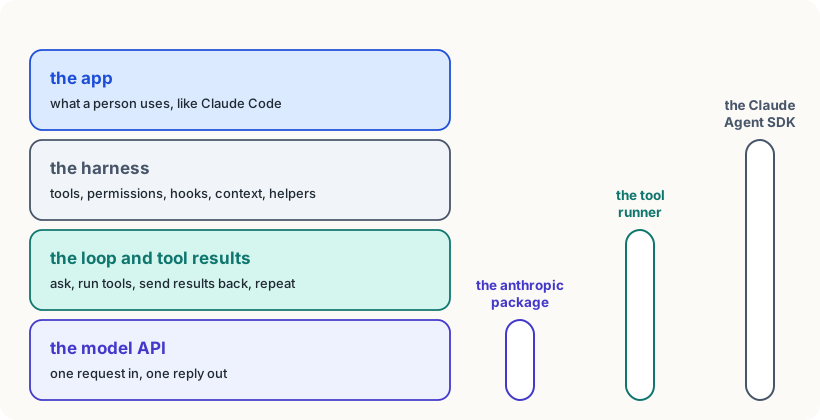
Start from the job, and pick the smallest thing that does it:
- No agent at all. If the steps are fixed (classify each email, summarise each report), a plain API call per item in a normal program is cheaper, faster and easier to test. An agent is for when the model must choose the steps.
- The tool runner. Your own tools, a handful of them, and the plain loop is all you need: a support bot that looks up orders, a script that answers questions over your database. You keep full control of the tools; the loop is done for you.
- Your own harness. You need control the libraries don't give: an unusual permission flow, tools that run somewhere special, a tiny program with no extra dependencies, or the point is to learn. mini is this.
- The Agent SDK. You want a serious coding or file-working agent inside your own product or pipeline: file editing that has been hardened against many edge cases, permissions, hooks, compaction. Building that well yourself is months of work.
There are many other frameworks, from other companies and open-source projects, and new ones every year. They all sit somewhere on the same ladder, and the questions are the same: which parts does it write for me, and can I change the ones I need to?
Careful
The tool runner is marked beta, and libraries change faster than the ideas under them: names, options and defaults move between versions. Pin the version you use, read its changelog before upgrading, and keep a small eval (from the last lesson) to run after every upgrade.
Try it
If you have a key, run the tool runner example in a folder with a
notes.txt, and print eachmessageit yields. Count the turns and compare them with mini's trace for the same question. Then ask: which of mini's protections is missing? (Try asking it to count the words in a file outside the folder.)
Using it well
- Pick the smallest thing that does the job. A fixed series of steps needs API calls, not an agent; a few tools need the tool runner, not a whole harness.
- Borrow the hardened parts. File editing, permissions and compaction have many edge cases; for a product, use code that has already met them.
- Know what the framework decides for you. When it does something odd, you'll find the cause faster if you know which job (the loop, a tool, the context, a permission) is misbehaving.
- Pin versions and keep an eval. A library upgrade is a change to your agent, and deserves the same test as a change to the prompt.
Words to know
- agent framework - ready-made code that runs the agent loop and often much more of the harness, so you write the tools and the task
- tool runner - the Anthropic SDK's helper that runs the loop around your own tool functions (
client.beta.messages.tool_runner) - Claude Agent SDK - Claude Code's harness as a library, with its tools, loop, context management, permissions and hooks
- decorator - a line like
@beta_toolabove a Python function, which passes the function to another function that wraps it
Big idea
Every agent framework does some of the jobs mini does, from just the loop to the whole harness. Pick the smallest one that fits the task, and use what building mini taught you to know what it's doing on your behalf.