Asking Before Acting
At the end of the last module, mini can read files, write files and run any shell command in its folder. It does whatever the model asks, as soon as it asks. That was fine for testing on a folder of junk. Before Leila points it at her real reports, mini needs to do what every agent she has used does: stop and ask.
Leila The simplest thing would be to put a check inside each tool. write_file asks "are you sure?", run_command asks too.
Omid That works for four tools. What happens when we add a fifth, or a sixth that someone else writes?
Leila Each one needs its own check, and sooner or later somebody forgets.
Omid So where could one check go that no tool call can get around?
Leila In run_tool. Every call from the model goes through it before it reaches any tool.
Omid Right. That's the same place Claude Code checks its permissions: the one door between the model's request and your computer. Now, what should the check say when it refuses?
Leila Nothing? It just doesn't run the tool.
Omid Then think about the next request. The model asked for a tool and got no answer. What does it see?
Leila A tool call with nothing after it. It would be stuck, or it would try the same thing again.
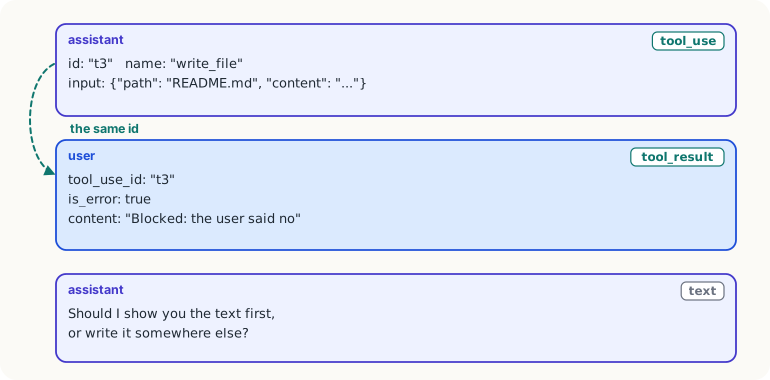
Omid And the API won't even accept that request: every tool_use block has to be answered by a tool_result with the same id. So a refusal is a result too. It just says "blocked", and why.
One function decides
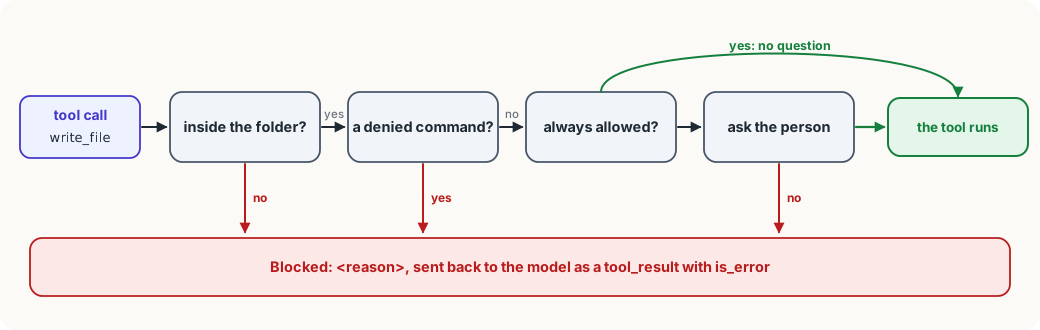
A permission check is a function the harness calls before running any tool call, which says whether it may run. In mini it's called check_permission. It gets the tool's name and its inputs, and returns None if the call may run, or a short reason if it may not:
ALLOW = {"read_file", "list_files", "load_skill", "delegate"}  # never ask
DENY_COMMANDS = ["rm -rf", "git push", "curl ", "sudo "]


def check_permission(name, args):
    """None if the call may run, else the reason it may not."""
    if "path" in args and inside(args["path"]) is None:
        return f"{args['path']} is outside the project folder"
    if name == "run_command" and any(bad in args["command"] for bad in DENY_COMMANDS):
        return "that command is not allowed in mini"
    if name in ALLOW:
        return None
    answer = input(f"\nmini wants to {name} {json.dumps(args)[:200]}. Allow? [y/N] ")
return None if answer.strip().lower() == "y" else "the user said no"Read it from the top, because the order is the design:
- Refuse what must never happen. A path outside the project folder (
insideis the function from Tools That Touch Files) and the commands on the deny list are refused before anything else is looked at. No allow rule and no "yes" from a tired person can get past these lines. - Allow what is always safe. Reading and listing files can't change anything, so they never ask. (
load_skillanddelegatearrive in a later module; they only read, too.) - Ask about everything else. Writing a file or running a command waits for the person. Anything but
ycounts as no, so pressing Enter by mistake is safe.
This is the same shape you met in agent permissions: deny first, then allow, then ask. Here it's twelve lines you can read.
Wiring it into run_tool
The check goes into run_tool, just before the tool runs:
def run_tool(block, allowed):
    name, args = block.name, block.input
    reason = None if name in allowed else f"no tool called {name}"
    reason = reason or check_permission(name, args)
    if reason:
        return {"type": "tool_result", "tool_use_id": block.id,
                "content": f"Blocked: {reason}", "is_error": True}
... # run the tool, as beforeNotice three things:
- A refusal is still a
tool_result, with the sametool_use_idas the call it answers. The conversation stays valid, and the model learns what happened. is_errorisTrue. It tells the model that this call didn't work, the same way a crashed tool does, so it chooses another way instead of carrying on as if the file were written.- The reason is written for the model. "the user said no" makes it stop and ask what Leila wants; "outside the project folder" makes it try a path inside. A bare "no" would leave it guessing.
What a deny list can't do
The deny list looks reassuring, but it only matches text. rm -rf old/ is refused; rm -r -f old/ is not, and neither is find old -delete, or a Python one-liner that deletes the same files. A model doesn't need to be up to anything to write one of those: it just wants to finish the job and picks another way when the first is blocked.
So use each rule for what it's good at:
- An allow list is strong. "Reading never asks, everything else does" can't be talked around, because anything it doesn't name falls through to the question.
- A deny list is a speed bump. It catches the common mistake and gives the model a clear reason. It doesn't stop a determined way round.
- Real limits come from outside the program. To be sure a command can't touch anything else, run mini inside a sandbox: a container or a separate user account with access to one folder and no network. Then even a command that slips past every rule can only reach what's in there.
Try it
With your API key set, start mini in a practice folder and ask it to "create a file called hello.txt saying hi". Answer
nwhen it asks. Then read what it says next: it has seen your refusal as a tool result. Run it again and answery. No key? Read the two messages in the second picture and write down, in your own words, what the model knows after each one.
Using it well
- Put the check in one place. Every call should go through a single function before any tool runs, so a new tool can't arrive without one.
- Put the hard refusals first. Rules that must never be overridden go above the allow list and the question, so nothing later can undo them.
- Answer every tool call. A refused call gets a
tool_resultwith its id andis_error, or the next request fails and the model is left guessing. - Trust allow lists more than deny lists. List what is safe and ask about the rest; use a sandbox for what must be impossible.
Words to know
- permission check - a function the harness calls before every tool call, which lets it run, asks the person, or refuses it with a reason
- deny list - patterns that are always refused; quick to write, but easy to get around with a differently written command
is_error- a field of atool_resultthat tells the model its call failed or was blocked, so it should try something else
Big idea
In your own agent, permissions are one function that every tool call passes through before it runs: refuse what must never happen, allow what is always safe, and ask about the rest. A refusal is still an answer, sent back as an error result, so the model knows and can change course.