Describing a Tool
So far mini can hold a conversation, but it can't do anything. Leila asks it "What's in notes.txt?" and it answers, quite honestly, that it can't see her files. You know from tool use what's missing: the request has to tell the model which actions it may ask for. This lesson writes that part of the request, in Python.
Leila So I give the model a function, and it calls it?
Omid The model never calls anything. What does it actually need from us, to be able to ask for an action?
Leila Its name, so it can say which one it wants. And what it does, so it knows when to want it.
Omid Good. And when it asks to read a file, what does it have to tell us?
Leila Which file. So it needs to know what inputs there are, too.
Omid And how do we make sure its request is in a shape our code can use? If it writes "please read the notes file", what do we do with that?
Leila Nothing, really. We'd want something like a form, with named fields. A field called path, and it has to be text.
Omid That's exactly what we send: a name, a description in plain words, and a form for the inputs. The form is written in a standard called JSON Schema.
A tool, as a dictionary
A tool definition is a dictionary with three keys. Here is mini's first tool:
read_file_tool = {
    "name": "read_file",
    "description": "Read a text file in the project. Use before changing a file.",
    "input_schema": {
        "type": "object",
        "properties": {
            "path": {"type": "string", "description": "path relative to the project folder"},
        },
        "required": ["path"],
    },
}What to notice:
nameis how the model will refer to the tool. Short, lowercase, and a verb with a noun:read_file,run_command.descriptionis for the model to read. It says what the tool does and when to use it.input_schemais the form."type": "object"means "the inputs are a set of named fields";propertieslists each field with its type and its own description;requiredlists the fields that must always be filled in.
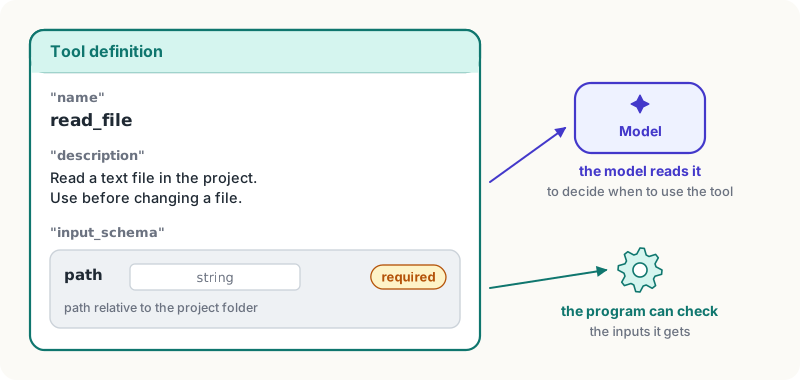
The input schema is written in JSON Schema, a widely used standard for describing the shape of data. You'll only need a few of its words: "string" for text, "integer" and "number" for numbers, "boolean" for true or false, "array" for a list, and "enum" for a field that must be one of a fixed list of values, like "enum": ["celsius", "fahrenheit"].
Sending it
Tools go into the request as a list, beside the messages:
response = client.messages.create(
    model=MODEL,
    max_tokens=16000,
    system=SYSTEM,
    tools=[read_file_tool],
    messages=[{"role": "user", "content": "What's in notes.txt?"}],
)
print(response.stop_reason)
for block in response.content:
print(block.type, getattr(block, "name", ""), getattr(block, "input", ""))If the model decides the tool would help, it doesn't answer. It writes a tool_use block and stops, and stop_reason says why it stopped: "tool_use". The printout looks something like this:
tool_use
thinking
tool_use read_file {'path': 'notes.txt'}The first block is the model's thinking (Opus 5.5 always thinks, and its text is left out by default). The second is the request itself. It has three parts: block.name is the tool, block.input is a Python dictionary already shaped by your schema, and block.id, a string like "toolu_01A...", labels this request, so the answer can be matched to it. That's the next lesson.
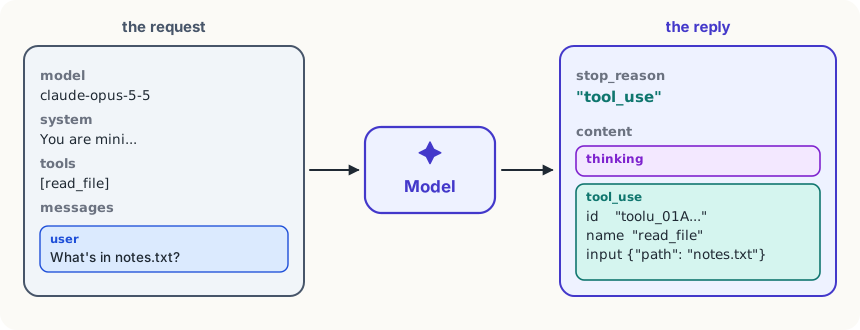
The model chooses whether to use a tool; you can't make it. (Older models accepted a setting that forced a tool call; Claude's newest models refuse it.) If a task must use a particular tool, say so in your message or system prompt: "Use read_file to look at the file before answering."
Leila If every tool is a dictionary like that, mini will end up with a long list of them.
Omid And each one has a function behind it. Where would you keep the two, so they can't drift apart?
Leila Together. One table: the name, the function, the description and the inputs.
mini's tool table
mini keeps every tool in one dictionary, TOOLS, and builds the definitions from it. A tool is its function, its description and its inputs:
TOOLS = {  # name -> (function, description, inputs)
    "read_file": (read_file, "Read a text file in the project. Use before changing a file.",
                  {"path": "path relative to the project folder"}),
}

def tool_schemas(names):  # the descriptions the model reads
    return [{
        "name": name,
        "description": TOOLS[name][1],
        "input_schema": {
            "type": "object",
            "properties": {k: {"type": "string", "description": d} for k, d in TOOLS[name][2].items()},
            "required": list(TOOLS[name][2]),
        },
} for name in names]tool_schemas(["read_file"]) builds exactly the dictionary above. Every input of a mini tool is a required piece of text, which keeps the table short; a bigger agent would give each input its own type. Adding a tool is now one line in TOOLS. The next module adds three more.
Descriptions the model uses well
The description is all the model knows about a tool, and it decides from it alone. A good one says:
- what the tool does, in a sentence: "Read a text file in the project."
- when to use it, and when not: "Use before changing a file." "Not for folders: use list_files."
- what the inputs look like, with an example where it helps: "path relative to the project folder, like reports/march.md".
- what comes back, if it isn't obvious: "Returns the exit code and the output."
Every description is sent in every request, so a sentence or two each is plenty, and ten sharp tools beat forty overlapping ones.
Try it
With your key set, run the request above in a folder with a
notes.txtand print the blocks. It costs well under a cent. Then change the description to just"Files."and ask "What's in notes.txt?" a few times: does the model still use it? Without a key: write the definition, as a dictionary, of a tool you'd want for your own work. Does its description say when to use it?
Using it well
- Name tools with a verb and a noun.
read_file,send_email,list_orders: the model picks between names, so make them say what they do. - Write the description for the moment of choosing. "Use when..." and "not for..." do more than a longer list of features.
- Keep the definition next to the function. One table for both means a renamed input can't leave the description behind.
- Ask for the tool in the prompt when it matters. You can't force a tool call, but you can say which tool the task needs.
Words to know
- tool definition - the dictionary that offers the model a tool: its name, its description and its input schema
- input schema - the part of a tool definition that describes the tool's inputs: their names, types and which are required
- JSON Schema - a standard way to describe the shape of data, used for tool inputs
- stop_reason - the field of the reply that says why the model stopped writing;
"tool_use"means it is waiting for a tool to be run
Big idea
A tool, to the model, is a name, a description and a form for its inputs, sent with every request. When the model wants it, it stops with a
tool_useblock: the name, the filled-in form and an id. Everything else is up to your code.