Counting What You Send
Leila runs mini on a real project for the first time: forty files, a test suite, a task that takes twenty minutes. It works. But the bill for that one task is more than all her practice runs together, and towards the end mini seemed to lose track of what she'd asked for. Before changing anything, she wants to see it: how big is each request mini sends, and what is it made of?
Leila I could count it myself. Add up the characters of everything in messages, divide by four.
Omid You could. What would that miss?
Leila The system prompt and the tool descriptions, unless I remember them. And the four is only a rough rule for English. My reports have tables and numbers in them.
Omid And the messages hold more than text: tool calls, results, the model's thinking. Who knows exactly how many tokens all that came to?
Leila The API. It had to read every one of them.
Omid So ask it. Every response says exactly how many tokens the request had, and there's a way to ask before you send one, too.
The size of every request
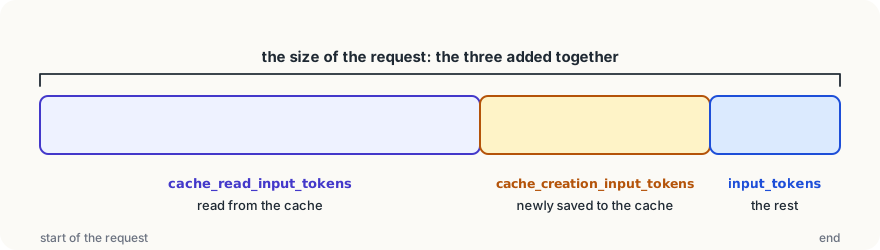
Every response carries a usage object: the API's own count of what you sent and what it wrote. You met it in Reading the Reply. For managing the context, the question is: how big was the request I just sent? That's three fields added together:
u = response.usage
size = u.input_tokens + u.cache_read_input_tokens + u.cache_creation_input_tokens
print(f"turn {turn + 1}: request {size:,} tokens, reply {u.output_tokens:,}")Why three? Because of caching, which comes at the end of this module. When part of a request is read from the cache, those tokens are counted in cache_read_input_tokens, not in input_tokens; tokens newly written to the cache go in cache_creation_input_tokens. Only the rest is input_tokens. Add all three and you have the whole request, cached or not. (It's an easy mistake to watch input_tokens alone, see it stay small once caching works, and think the context isn't growing.)
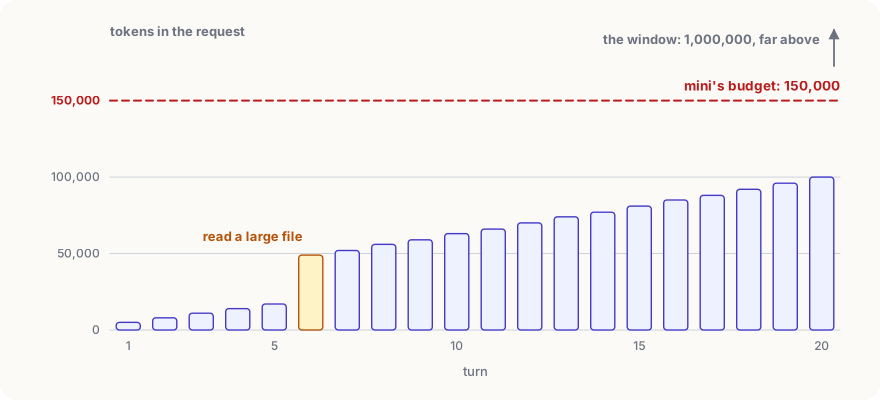
Put that print in mini's loop, right after the response arrives, and run a real task. You'll see the shape from the context window in your own numbers: every turn a little bigger than the last, with sudden jumps where a tool returned something large.
Counting before you send
Sometimes you want the number before you spend anything: will this file fit? How much will this long paste add? The API has a separate endpoint for that, count_tokens. It takes the same arguments as a request and returns the count, without running the model:
def tokens_in(text):
    """How many tokens `text` would add, as a user message."""
    count = client.messages.count_tokens(
        model=MODEL, messages=[{"role": "user", "content": text}])
    return count.input_tokens


print(tokens_in(Path("big_report.csv").read_text()))Counting is free, though it's still a request to the API, so it takes a moment and is rate-limited like any other. Pass system= and tools= as well and you get the size of a whole request before you send it. Use the model you'll actually send to: tokenizers differ between model families, so the same text can count differently.
Where mini's tokens go
Measure a few sessions and the picture is usually the same:
- The fixed start (system prompt and tool descriptions) is small for mini: around a thousand tokens. It grows when you add instructions and skills in the next module.
- The model's own messages are short: a sentence, a tool call.
- Tool results are almost everything. One
read_fileof a 3,000-line file can be 30,000 tokens, and it stays in every request after that.
That's why mini's cut_long_output hook keeps at most 10,000 characters of any result (roughly 2,500 English tokens). It's also why a better read_file would take a range of lines, and a search tool would beat reading files whole. The cheapest token is the one that never enters the context.
Why a budget far below the window
mini sets CONTEXT_BUDGET = 150_000, though the model's window holds a million tokens. Three reasons, which you can now see in your own numbers:
- Every turn pays for the whole request. A 600,000-token request costs about 2.40 dollars of input at 4 dollars per million before caching, every turn.
- A crowded context works worse. Answers tend to get vaguer as the context fills with old results, long before the window is full.
- The reply needs room too, inside the same window.
When a request passes the budget, mini compacts. That's the next lesson.
Try it
Add the
Using it well
- Log the request size every turn while you build. One line of output tells you more about your agent's context than any guess.
- Add up all three input fields.
input_tokensalone stops meaning "the size of the request" as soon as caching works. - Count before you add something big.
count_tokensis free; use it to decide whether a file goes in whole, in part or not at all. - Shrink tool results at the source. A cap, a line range or a search tool keeps the context small for every turn that follows.
Words to know
usage- the part of every response that reports the request's tokens (input_tokens,cache_read_input_tokens,cache_creation_input_tokens) and the reply's (output_tokens)count_tokens- an API endpoint that counts the tokens of a request without running the model; free- context budget - a limit you set, well below the window, at which your agent shortens its context
Big idea
You don't have to guess your agent's context: the API reports the size of every request, and can count one before you send it. Measure it every turn, and you'll see that tool results fill the window, so that's where to cut.